
Chapter 05 : The Atelier: documents, spreadsheets, presentations
Jay doesn't hand back text to copy and paste: it writes real files. A Word or PDF document, an Excel workbook, a presentation, a web mockup. These files are called pieces, and they live in the Atelier, in two places at once: in the Atelier tab of the drawer of the session that produced them, and in the Atelier place in the icon bar, which gathers them all.
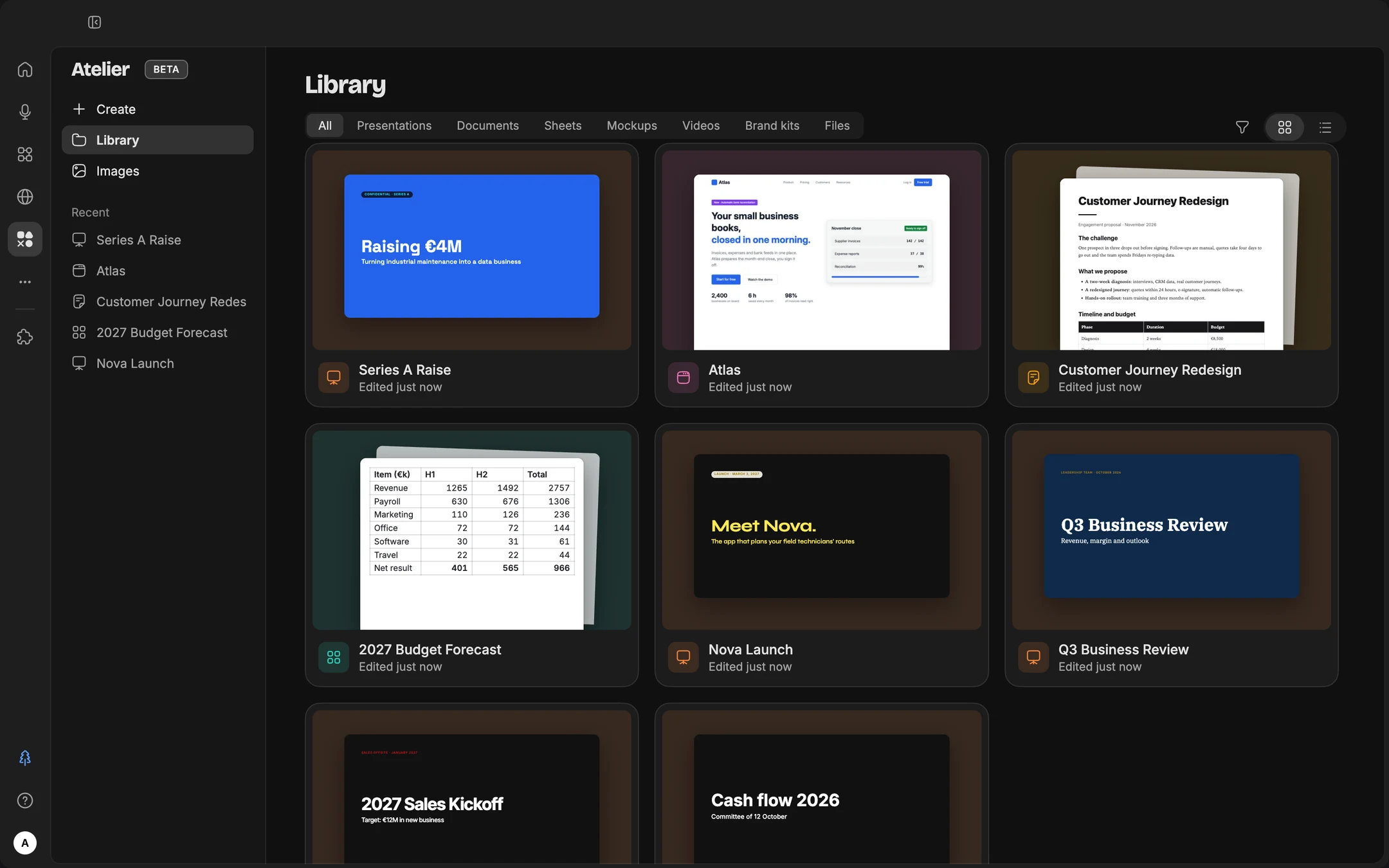
The Atelier place
It opens on the Library: Recent, All, Presentations, Documents, Sheets, Mockups, Videos, Files (exported PDFs, Word, Excel and PowerPoint files), and two sections that now live there: Images and Brand kits (chapter 6). A single "Create" button opens a menu: Presentation, Document, Spreadsheet, Mockup, Video (or Video from a template), Image, then Brand kit and "Import files". Opening a piece takes you back to its session, with the drawer wide open: you keep changing it by talking to Jay.
In a Work session, you don't even have to go through the place: the "+" in the bar, under Do, offers Document, Spreadsheet, Presentation, Mockup, Video, Image and Brand kit. The chosen kind shows as a chip in front of the field, and your next message produces the piece. While it writes, a Jay cursor moves across the piece, with a sentence that says what it's doing.
Atelier pieces are written with Versatile, Thinking or Expert: in Adaptive, Jay picks one of the three.
On disk, a project's pieces are in its Jay/ folder. So they are where you expect them, openable in Word, Excel or Keynote, and attached to an email with a single drag.
What Jay produces
| Piece | What you get | What you ask for |
|---|---|---|
| Document | A laid-out Word file or PDF. Jay can also revise an existing Word file: it writes a "-revised" copy next to it, never over the original. It fills in PDF forms. | "Turn this into a document I can share." |
| Spreadsheet | An Excel workbook with formulas, formatting and charts, calculated with code | "Put these figures in a spreadsheet, with a total per month and a chart." |
| Presentation | Slides made of real objects, in your brand kit's theme, that you present from Jay or export to PowerPoint, PDF, PNG, web page or Google Slides | "Turn this report into 8 slides for the committee." |
| Mockup | A web page or several screens, laid out on a canvas, to show an idea before building it; all the way up to animated 3D scenes | "Mock up the landing page for the offer." |
| Video | A short animated video in MP4 (chapter 6) | "A 20-second teaser for this launch." |
The mockup canvas. A mockup opens wide in the drawer, on an infinite canvas: pages, screens you move around, and a toolbar (Select, Hand, Text, Frame to create a screen, Sticky note, Pen, Shapes). Select an element on the page: the inspector, on the right, shows its properties and code, and whatever you change there is written straight into the file, in the right place, with ⌘Z. Play runs the mockup on the canvas or full screen. The settings a mockup declares (color, density, variant) can be changed in the Tweaks tab, without asking Jay again.
Docs: documents worth rereading
Ask for a document rather than an answer in the session whenever the result needs to be reread, shared or reused: a memo, a procedure, a sales proposal, meeting minutes.
Create a document: [type of document] for [audience], which must [decision or use].
Structure: [desired sections], or suggest the most suitable one. Tone: [tone]. Length: [number of pages].
Draw on [files in the folder]. Start with a sentence that gives the conclusion. Add a table when you compare options. Apply the [name] brand kit.
Slides: presentations in minutes
- Give the message before the slides. "By the end, the committee must approve the budget." Every slide then serves to defend that message.
- Provide the material. Your notes, a document from the folder, figures. Jay structures and formats.
- Approve the outline before the design. First ask for the list of slides, with a message title for each.
- Improve slide by slide, then present or export. One request at a time makes a stronger deck than a list of ten changes.
Jay always builds a deck in three stages, shown in the Atelier: content first (the material, the messages, the outline), then the layout of each slide, chosen based on its content, and finally the design. Without a brand kit, it picks a look based on the topic, from fourteen (Swiss, Luxe, Brutal, Retro, Playful, Clinical…); you change it in the Style menu, which separates Looks and Brand kits. A brand kit named in the request is applied in the third stage, on an outline that's already right. A slide image can be regenerated or replaced from the inspector.
Prepare a [number]-slide presentation for [audience] on [topic].
Goal: by the end, they must [decision or action]. Material: [your notes, or the file in the folder].
Step 1: suggest the outline, with for each slide a title that is a message sentence, not a theme, and the key elements.
Step 2: once I approve, create the presentation with the [name] brand kit. One idea per slide, little text, a chart whenever there are figures.
Spreadsheets: calculations done with code
A language model is bad at mental math. Jay, on the other hand, calculates with code and writes the result into the workbook with its formulas: you can check every cell.
Here is an export of [type of data]: [file path], covering [period].
1) Describe the content of the file and flag any quality issues.
2) This workbook should help [audience] answer these questions: [3 to 5 questions].
3) Build it: the 4 key indicators at the top, then one tab per question with its chart.
Write the formulas in the cells and check the totals with code. Under each chart, write in one sentence the takeaway.
And your Google files
With the Google Drive app (chapter 10), Jay also creates Google Docs, Sheets and Slides in your Drive and writes in them, exports an Atelier piece to Drive, and edits an existing Google file whose link you give it. Searching and organizing across your whole Drive requires full access, still reserved for the Lab. An Atelier piece stays on your Mac; a Google document lives in Drive. Choose based on where your colleagues will read it.