
Chapter 11 : Skills
A Skill is know-how you teach Jay once and that it applies whenever the situation calls for it: your way of writing meeting minutes, your way of reviewing a contract, your brand guidelines, your hiring process. Jay ships with nearly ninety of them, grouped into packs by job, and you create your own in a single conversation.
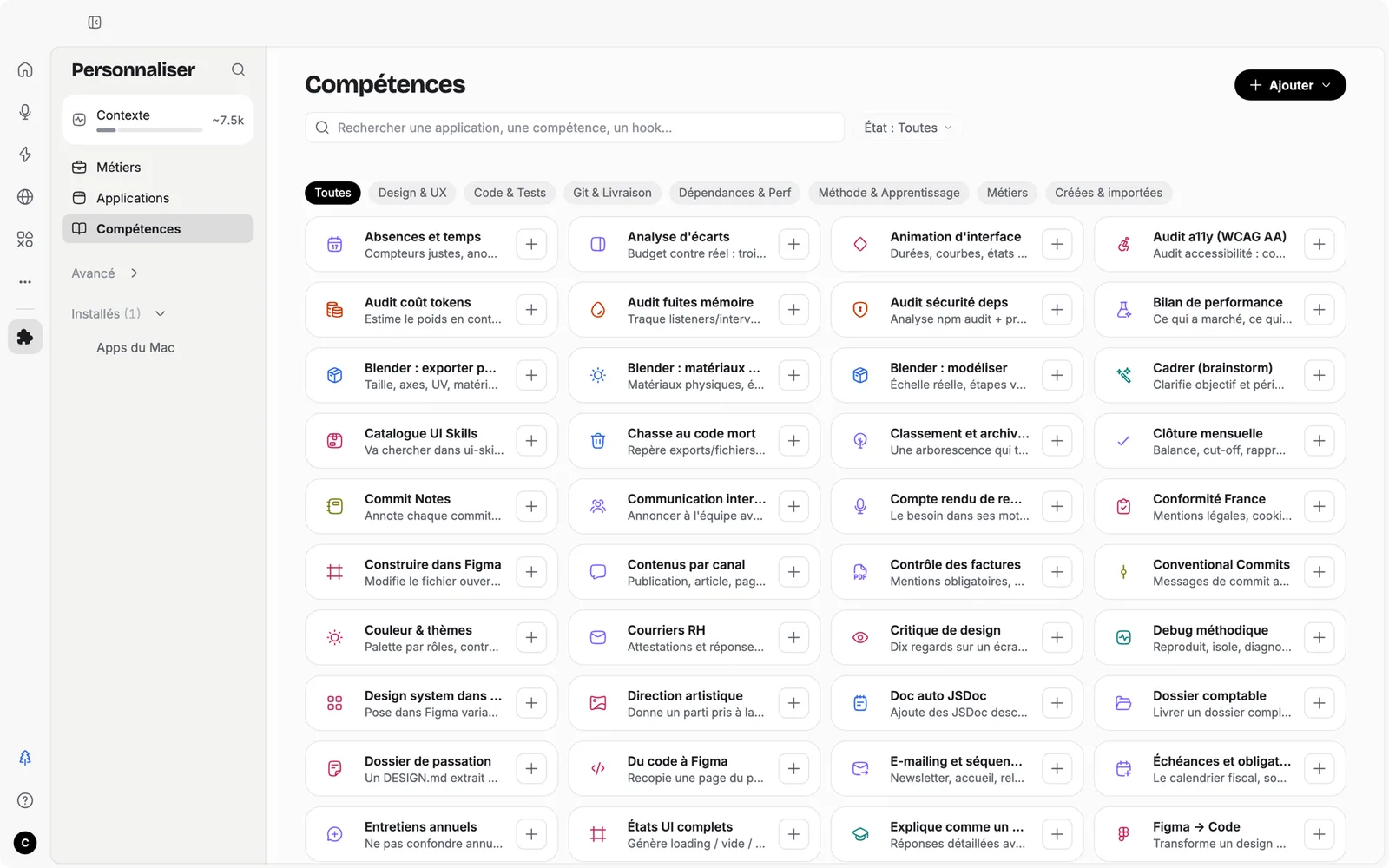
Some screenshots show the app in French; the English interface has the same layout.
JAY.md or Skill?
| A project's JAY.md | A Skill | |
|---|---|---|
| Scope | A single project | All your sessions |
| Trigger | Always read in the project | Turned on in Customize, or called by its /name command |
| Content | Text: the context, the folder's rules | A method: the steps, the format, the criteria, the pitfalls |
| Ideal for | The context of a client or a topic | A way of working reusable across several contexts |
Skills in Customize
Skills are the second family in Customize (chapter 10). A filter shows them all, active or inactive; each card states its weight in the context (light, moderate, heavy), its command, and offers examples that launch a session.
Packs. The Customize home, Roles, groups them by job: Designer, Front-end developer, Marketing, Communication, Finance, People, Administration, Sales. A pack turns on a set of Skills in one move; it can be off, partial or on. The six job packs share a base of four cards: writing, summarizing, spreadsheet, presenting.
From your sessions. Jay spots what you keep asking it for and offers to turn it into a Skill, already pre-filled with your own words.
Your job profile
The job profile (chapter 3) is the gateway to Skills. Type /metier, or click “Start the interview”: Jay asks you questions, one at a time, then shows you a plan card: the Skills, connectors and rules it suggests installing. Nothing installs without your click. Profiles add up.
Creating your own Skill
A Skill has four fields: a name, a command, a description and instructions. Take particular care with the description: it says what the Skill does and when to use it, and it's what Jay reads to decide whether to use it. The form shows its weight in tokens.
The easiest way: have Jay write it. Customize, “Add”, “Create a skill with Jay”: it asks its questions and pre-fills the form. “Write a skill” opens the empty form.
I want to turn this method into a Skill: [describe the task and how you do it]. A good example of the result is in [file in the folder].
First ask me the questions you need: steps, format, quality criteria, pitfalls.
Then write the Skill: a description that says when to use it in the words I would use, concrete steps as if for a new colleague, a Verification section with what must never be wrong. Suggest a short command for it.
Name: Meeting minutes
Command: /cr
Description: Writes the minutes of a meeting from a transcribed meeting or from notes. Use it when the request mentions minutes, a meeting summary, meeting notes or a follow-up after a call.
Instructions:
1. Identify the participants, the date and the topic.
2. Extract the decisions, then the action items with owner and deadline.
3. List the open issues.
4. Save the minutes in Minutes/YYYY-MM-DD-topic.md and prepare a follow-up email of 150 words maximum, as a draft.
Format: short headings, lists, no introductory phrases.
Verification: flag any ambiguous name, number or date instead of guessing.
Sharing and importing. A Skill exports as a .zip from its card, and imports via “Add, Import a skill”, from a file, a GitHub repository or a URL. That's how a team shares its way of working: one file, and everyone reviews contracts the same way.
Hooks: automatic reflexes
A hook is a rule that fires at a specific moment: when you send a message, when Jay finishes a response, before or after it uses a tool, when the app starts. They live in Customize, Advanced, Hooks.
| Type | What it does | Example |
|---|---|---|
| Rule (safeguard) | Ask for confirmation, Refuse, or Remind Jay of something, without running any command | “Before any write in Contracts/, refuse.” |
| Command | A small script run on the event, limited to 5 seconds, that never blocks the session | Format a file after each edit, notify an app |
Rules are the right starting point if you don't code: they keep Jay in bounds without a single line of script. Commands are for developers (chapter 15).
Commands to know
| Command | What it does |
|---|---|
| /plan and /build | Switch to Plan mode (read-only), then execute it |
| /image | Messages produce images |
| /compact | Summarize the session to free up context |
| /goal | Clarify a goal, then produce a structured specification |
| /metier | Build your job profile |
| /commit, /diff, /status, /pr | The Git moves (chapter 15) |
| /model, /effort, /permissions | Change mode, effort, access level without leaving the keyboard |
| /new, /clear, /help | A new session, clear the conversation, help on commands |
| /name | Each Skill has its command; a Command hook can have one; in the Browser, “/” opens a WebFlow |