
Chapter 14 : Flows and watches
A task set up once can then run every day or every week, with the window closed. With Jay, it runs on your Mac, with your folders, your connectors and your apps: that's what no online service can do. This chapter shows you how, with ten recipes ready to schedule.
Three ways to automate
| Tool | What it is | What for |
|---|---|---|
| Flows | A task that is scheduled or triggered by a folder, in the Flows place | Recurring tasks: monitoring, reports, day prep, tidying |
| WebFlows | A recipe recorded in the Browser, that can be replayed | A client portal to check, a form to fill in every month |
| Watches | A wait set by Jay in a session: it re-checks a command or a page at intervals, without the model, and comes back to the session on the signal | "Let me know when the deployment is done," "come back when the page changes" |
Flows
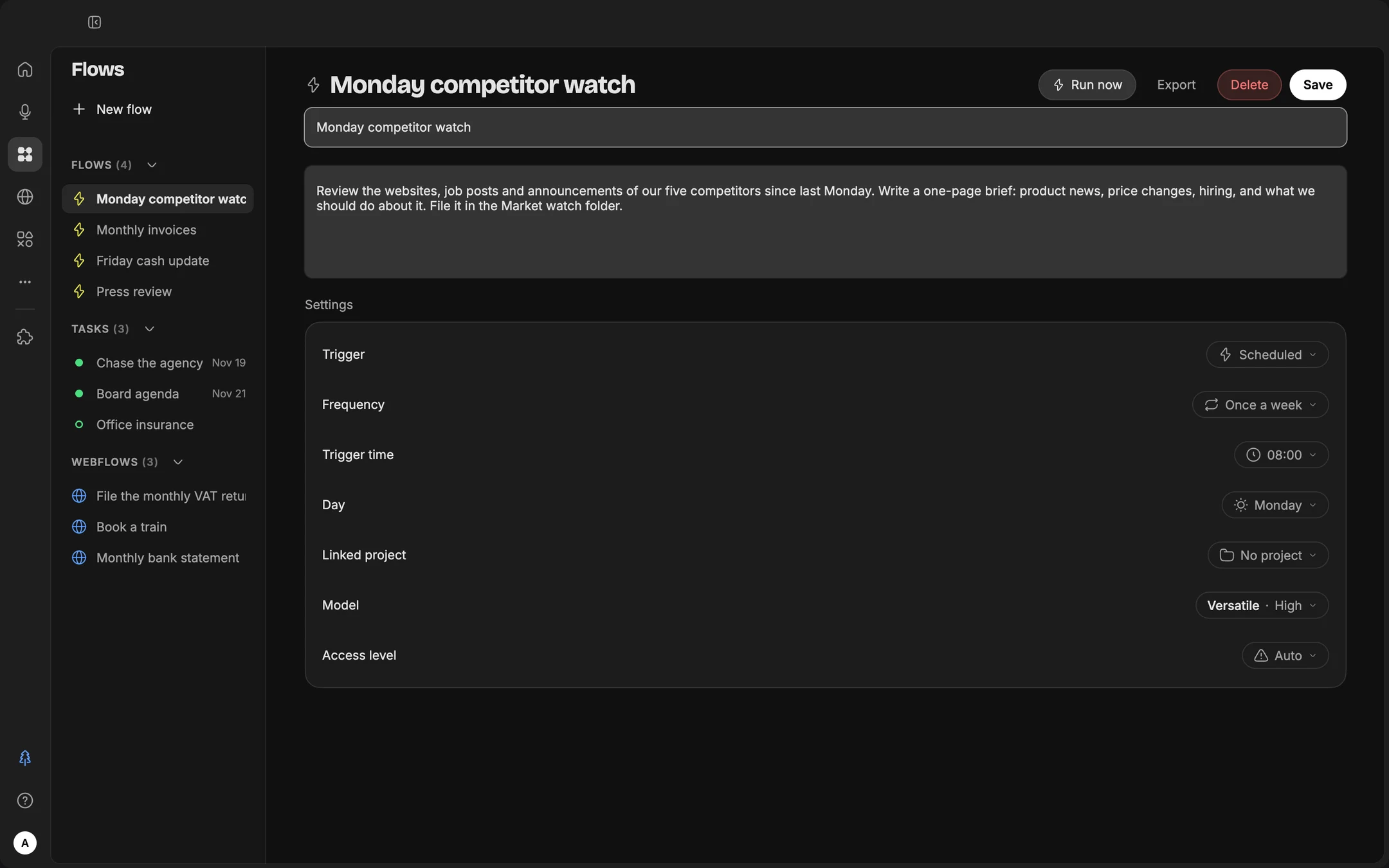
In the Flows place, "New flow," in With Jay mode (you describe, it sets things up) or Manual. Or, more simply, in any session: "schedule this every Monday at 8 a.m.," and Jay creates the flow.
| Setting | Options |
|---|---|
| Trigger | Scheduled, or When a file arrives in a watched folder |
| Frequency | Manual (on demand), Once only, Every day, Weekdays, Once a week, Every hour, Every N minutes |
| Access level | The same choice as in a session: Ask, Auto, Full |
| Model | The mode that runs the flow |
| Linked project | The folder where the flow reads and writes |
Resident Jay. The flows clock runs as long as the Mac is awake, with the window closed or never opened. For a morning flow, leave the Mac on, or turn on "Keep Mac awake": lid open, or even lid closed, with the "Only on power adapter" option.
The watched folder. It's the most natural automation on a computer: "every time a PDF arrives in Invoices-to-process, read it, rename it and add a row to the spreadsheet." You drop it in, Jay handles it.
Scheduling a task: the 3-day method
Most beginners schedule a task on the very first try. The following Monday, the result is way off, and they give up. We'll do the opposite: fine-tune first, schedule afterward.
- Do it by hand first. Run the task once, in a session, and fix the brief until you're happy with the result.
- Schedule it. "Schedule this every Monday at 8 a.m.," in Ask or Auto, never in Full to start.
- Specify where the result goes. A file in a folder, an email draft, a Notion page. And how you're notified: a macOS notification.
- Review the first three results, then adjust. On day one, you fix the brief. On day two, the details. On day three, it's set. If a flow still needs corrections after a week, its brief is too vague.
Ten flows ready to schedule
| Flow | Frequency | What it does | You need |
|---|---|---|---|
| The prepared morning | Weekdays, 8 a.m. | Today's calendar, emails to handle, meeting prep | Calendar, email |
| Industry monitoring | Every Monday | What's new in your industry, summarized in one page in the Monitoring folder | Web search |
| The Monday report | Every Monday | Last week's numbers, with commentary, in the usual format | A folder or a data connector |
| Invoices on arrival | Watched folder | Each PDF dropped in is read, renamed, filed and added to the spreadsheet | A folder |
| Reminders | Every Wednesday | Invoices unpaid for 30 days, with a draft reminder | Pennylane or a spreadsheet, email |
| The monthly statement | Manual (on demand), on the 1st | A WebFlow that downloads the statement from your client portal | The Browser |
| Tomorrow, ready | Every evening | A brief for each of tomorrow's meetings | Calendar, email, Drive |
| Tidying up | Every Friday | Downloads sorted and renamed, without deleting anything | Nothing |
| The newsletter digest | Every Saturday | The week's newsletters summarized in 10 points with the links | |
| Goal tracking | Manual (on demand), at month's end | Where you stand on your quarterly goals, and what's blocking | A project with your goals |
Monitor [industry] over the last 7 days.
Players to follow: [list]. Priority topics: [list].
Deliverable: one page with 5 key facts (source and date for each), 3 weak signals, and "What this changes for me" in 3 points.
Save it in Monitoring/ as "Monitoring - [date]", reread the previous one so you don't repeat yourself, and notify me. Don't make anything up: if the week was quiet, say so.
Watch the Invoices-to-process folder. For each new PDF: read it, rename it "YYYY-MM-DD supplier amount.pdf", move it to Accounting/2026/[month], and add a row to the Invoices-2026.xlsx spreadsheet: date, supplier, amount before tax, VAT, total including tax, due date.
If any information is unreadable, leave the cell empty and add "to check" in the last column. Never delete anything.
Watches
A flow comes back at the set time. A watch comes back at the right time. When a turn ends on a wait (an export running, a deployment, a page that should change, a file that should appear), Jay sets a watch instead of asking you to come back: it re-checks the command or the address at intervals, without making the model work and so without using your volume, until the output changes, succeeds or contains the expected text. On the signal, it wakes up in the same session, with all its context, and picks up where it left off.
The Activity tab of the drawer shows the watches in progress: what they re-check, how often, the next check. You can stop one; its session then won't be woken up. You can also ask for one yourself:
Re-check [address] every 10 minutes. As soon as [the product is back in stock / the result is published / the page shows "…"], come back here and tell me what changed. Don't buy anything, don't fill anything in.
Scouts, the named agents with long-running missions that some accounts were trying out in the Lab, are paused for now: their useful routines can be rebuilt as flows.